
How Do You Maintain a Water Vapor Fireplace?
The full maintenance routine for water vapor fireplaces, from transducer cleaning to troubleshooting a weak or missing flame effect.


A smart electric fireplace gives you control over heat output, flame color, brightness, and scheduling directly from your phone or a voice assistant. Whether you want to warm a room before you get home from work or dim the flames without leaving the couch, the best smart electric fireplaces make that possible without any gas line, chimney, or professional installation. This guide explains how smart connectivity works, what to evaluate before buying, and which models are worth considering for 2026.
An electric fireplace qualifies as smart when it can connect to your home Wi-Fi network and be controlled remotely through a smartphone app or voice assistant. The minimum standard is Wi-Fi connectivity with a dedicated app. The better models also support scheduling, automation routines, and integration with platforms like Amazon Alexa or Google Home.
Capabilities vary by brand and model. Some fireplaces ship with an app that handles flame color, heat level, timer, and on/off. Others add voice control through third-party integrations. What matters most to you as a buyer is whether the app is reliable, which voice platforms are supported, and whether the fireplace still functions normally without a network connection.
Most smart electric fireplaces connect via 2.4 GHz Wi-Fi and pair with a brand-specific app. Through the app you can adjust flame settings, set a heating schedule, change heat output, and control the unit from anywhere with an internet connection. App quality matters considerably. Some brand apps are well-maintained with stable connections; others are less reliable. Checking the app store rating and reading recent reviews before you buy is worth the few minutes it takes.
Alexa and Google Home compatibility is available across most of the smart fireplace category. Once you link the fireplace to your preferred assistant through the brand's skill or action, you can use voice commands to turn the unit on or off, adjust heat, and trigger scenes and routines. Voice control is convenient, but it is limited to what the brand's integration actually supports. Not every voice command available in the app will be available via voice.
Scheduling is the most practical smart feature for daily use. You can program the fireplace to turn on 20 minutes before you wake up, run during peak comfort hours, and shut off automatically at a set time. Integration with Google Home or Alexa routines allows more complex automation, such as triggering the fireplace when you arrive home or when a connected sensor detects the room temperature has dropped.
Wi-Fi band compatibility. Most smart fireplaces require a 2.4 GHz Wi-Fi network. If your router broadcasts only 5 GHz, or uses a combined network with automatic band selection, you may need to create a separate 2.4 GHz SSID for reliable pairing. This is the most common setup issue and is straightforward to resolve in your router settings.
App ecosystem maturity. Check the app store rating for the brand's companion app before committing. Apps with consistent updates and a rating above 4 stars indicate the manufacturer is actively maintaining the product's software. A weak or abandoned app makes smart features unreliable regardless of the hardware quality.
Voice integration depth. Basic integrations support on/off and heat adjustments. More advanced integrations allow flame color changes and timer control via voice. Verify what commands are specifically supported through the brand's published documentation, not just whether it works with Alexa or Google in general.
Standalone operation. Smart features add convenience, but the fireplace should still function fully without a network connection. Confirm that the physical remote control and manual controls on the unit operate independently. A router outage should not leave you without heat or ambiance.
Heat output and installation type. Smart connectivity is a layer on top of the core product. Evaluate the fireplace the same way you would any electric unit: heater output (most are 4,750 to 5,118 BTU, covering approximately 400 to 500 square feet), installation type (recessed, wall-mounted, or insert), and viewing size.
The Landscape Pro Slim is a linear Wi-Fi enabled electric fireplace available in 44", 56", 68", 80", and 96" widths. It connects via the Modern Flames MultiView app and is compatible with Alexa and Google Home. The unit can be recessed flush into the wall or surface-mounted without a cavity. The 15" high viewing area and customizable RGB flame colors, ember bed, and downlighting make it one of the more visually flexible smart fireplaces in the category. The LPS is also rated for outdoor covered patio use.
The Orion Slim uses Modern Flames' virtual electric fireplace technology, which projects a 3D flame effect designed to closely resemble a real fire. Like the Landscape Pro Slim, it connects via Wi-Fi and supports app and voice control through the MultiView platform. The Orion Slim suits buyers who prioritize flame realism and want smart control alongside that aesthetic. It is available in multiple sizes for built-in or wall-mounted installation.
The Litedeer Latitude Built-in is a fully recessed smart electric fireplace with Wi-Fi connectivity, a dedicated app, and compatibility with both Alexa and Google Home. The app supports scheduling, flame adjustment, and temperature control. The Latitude is available in multiple sizes with a relatively shallow cavity depth requirement. A wall-mount version, the Latitude II, starts at $2,499 and includes a 3-inch trim frame for a clean finished look.
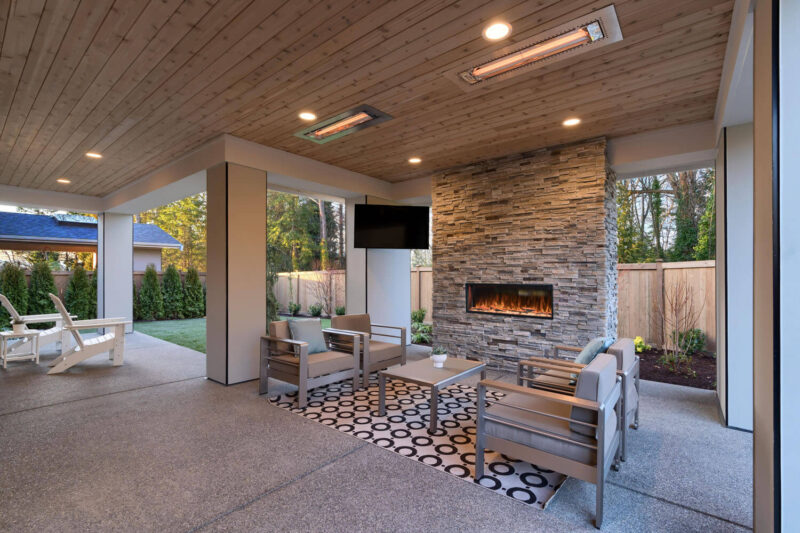
The Amantii Panorama DEEP series are indoor/outdoor rated frameless built-in fireplaces with smart app control and voice assistant compatibility. The DEEP designation refers to a deeper firebox that creates a more three-dimensional flame view than a standard slim-profile unit. Sizes range from 40" to 88". The indoor/outdoor rating makes the Amantii DEEP a strong option for covered outdoor entertainment spaces, screened porches, and interior feature walls where the fireplace is visible from multiple angles.
The SimpliFire Triton is a 3-sided built-in smart electric fireplace. The peninsula configuration creates a see-through effect from multiple angles, which suits open-plan spaces and room dividers. It connects via the SimpliFire app and is compatible with voice assistants. The Triton is one of the few smart fireplaces in the 3-sided format available under $4,000, which makes it a practical choice for contemporary open-floor plans where a traditional single-sided fireplace would not be visible from adjacent spaces.
Setting up a smart electric fireplace is straightforward when your home network is compatible. Most models pair through the brand app using a QR code or manual Wi-Fi credential entry. The process typically takes under 10 minutes from unboxing to a confirmed connection.
The most common issue is 2.4 GHz band incompatibility. If your router uses a single combined network name for both 2.4 GHz and 5 GHz bands, the fireplace may fail to connect or drop its connection repeatedly. The fix is to create a separate 2.4 GHz network in your router settings and connect the fireplace to that network. Your router's manual or manufacturer support page will have instructions specific to your model.
For voice assistant setup, the process requires linking the brand's skill (for Alexa) or action (for Google Home) to your assistant account, then discovering the fireplace as a device. Once discovered, you can group it with other smart home devices and include it in routines. Firmware updates are typically pushed automatically through the app, so keeping the app installed ensures the fireplace stays current.
Looking for the right model? Browse our full smart electric fireplace selection to compare sizes, brands, and installation types side by side.
Most smart electric fireplaces connect via 2.4 GHz Wi-Fi only. If your router broadcasts a combined 2.4/5 GHz network under one name, the fireplace may not connect reliably. Creating a dedicated 2.4 GHz network in your router settings is the most consistent fix. Some newer models may support dual-band, but 2.4 GHz is the current standard across most of the category.
Yes. Once the fireplace is connected to your home Wi-Fi and paired with the brand app, you can control it remotely from anywhere with a cellular or internet connection on your phone. Remote access typically allows you to turn the unit on or off, adjust heat output, change flame settings, and view or modify any active schedule regardless of your physical location.
Yes. Smart features require an active Wi-Fi connection, but the included remote control and manual controls on the unit itself continue to work without a network connection. A router outage or internet disruption will disable app and voice control, but will not affect the fireplace's core heating and flame functions. This makes smart fireplaces a reliable option even in areas with occasional connectivity issues.
Most smart electric fireplaces are compatible with Amazon Alexa and Google Home. Setup requires linking the brand's companion skill or action to your voice assistant account. Apple HomeKit compatibility is less common and varies by brand. Confirm the specific voice platforms each model supports before purchasing, as compatibility is listed in the product specifications or the brand's app store page.
A smart electric fireplace includes Wi-Fi connectivity, a smartphone app, and voice assistant integration. A standard electric fireplace is controlled only by a handheld remote or physical controls on the unit. The core heating and flame technology is similar in both categories. Smart features add remote access and scheduling convenience but do not affect the fireplace's heat output or flame appearance on their own.
Yes. Once the fireplace is linked to your voice assistant account, you can include it in automation routines alongside other smart home devices. You can set a morning routine that turns the fireplace on before you wake up, or a departure routine that ensures it is off when you leave. The specific commands available in routines depend on what the brand's integration supports, which varies by manufacturer.
Smart electric fireplaces typically start around $1,500 to $2,300 for wall-mount or recessed units with app and voice control. Premium models with advanced flame technology or larger sizes range from $3,000 to $5,000 or more. Smart connectivity itself does not add a significant price premium over comparable non-smart models in the same product line. The cost difference is usually driven by size, installation type, and flame quality rather than the smart features specifically.
Linear recessed smart fireplaces work best for TV wall installations. The Modern Flames Landscape Pro Slim is designed with entertainment wall use in mind. It has a low-profile installation that fits within standard wall cavity depths and is available in widths up to 96", making it possible to span a wide media wall. App control lets you manage both the fireplace and other smart devices from a single interface.
Smart electric fireplaces do not require professional installation beyond what any built-in electric fireplace requires. Recessed and built-in models require framing a wall cavity to the specified dimensions and routing a dedicated electrical circuit to the location. A licensed electrician is typically recommended for the circuit work if you are not experienced with electrical wiring. The smart features themselves add no installation requirements beyond a standard Wi-Fi connection after the unit is in place.
Look for an app with recent updates and a consistent user rating above 4 stars in both the App Store and Google Play. A well-maintained app reflects a manufacturer that is actively supporting the product's software over time. Features to confirm include scheduling, remote on/off, flame adjustment, and heat control from the app. An app with a poor or declining rating is a signal that smart features may become unreliable as the product ages.
The full maintenance routine for water vapor fireplaces, from transducer cleaning to troubleshooting a weak or missing flame effect.

Everything to know about the Superior VRL3000 vent-free linear gas fireplace: how it works, who it's for, and how it compares to other options.

{"one"=>"Select 2 or 3 items to compare", "other"=>"{{ count }} of 3 items selected"}
Leave a comment